

What is the My Maps Tool in LandApp Pro?
My Maps in LandApp Pro allows you to draw custom maps that can be used to enhance your listings, mark important locations, plan property development, and more. Overlay your maps with LandApp's 40+ unique data layers and easily share them with clients, colleagues, and more.
_gif.gif)
.jpg)
Parcel Data Icons & Legend
Hover over each green dot for a description of each tool
.jpg)
View all parcels within a selected portfolio
Check the box left of the parcels you want to list to initiate the listing process
View all of your portfolios
Search for/ filter specific parcels within the selected portfolio
Enable parcel grouping to group parcels by owner or county
Check this box to select all parcels within the portfolio
Add notes to a parcel or a group of parcels after checking all or some parcels in the list view
Adjust which columns are displayed in the parcel list view
View more parcel data and create property and asset reports
Export parcel data and ownership information ($0.09/ each)
Rename the selected portfolio
Scroll to the side to see more parcel data for each property
How to Customize and Share Portfolios
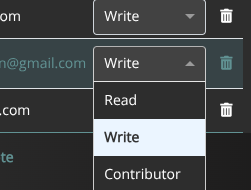
Customize your portfolios (border and fill colors) and add notes and descriptions. Share your portfolios with other users using their LandApp email address. You can allow others to view your portfolios with no editing permissions using the 'Read' function, or allow full editing access to other users with the 'Write' option.
1) Select & Open the Portfolio to Share or Edit

2) Click on the Gear Icon Next to the Portfolio Name

3) Adjust Border & Fill Colors, Add Description

4) Add User Emails to Share & Select Permissions

5) Add Notes for All Users to View (Optional)

6) Edit Shared Permissions at Any Time
Parcel Data Reports Icons & Legend
Hover over each green dot for a description of each tool

View sales & transaction history for each parcel (if available)
View all of your portfolios
Asset Reports point out the highest and lowest-value properties within large portfolios with many parcels
View land value and lease estimates for individual parcels sorted by APN number
The parcel summary values are for all parcels within the portfolio
View more parcel data and create property and asset reports
Export a property or asset report for the entire portfolio
Rename the selected portfolio
View estimated lease values for the whole portfolio or just selected parcels
Edit, share and add notes to portfolios
Check properties that you want included on the 'Reports' section and toggle this 'on,' otherwise all parcels in the portfolio will be included
Frequently Asked Questions
At this time, the Parcel Data tool in LandApp Pro is only available on desktop devices- not on the LandApp mobile application. On LandApp Pro on desktop, you can also use the My Maps and the Parcel Search tools.
Parcel Data allows you to view parcel data, value and risk index scores, ownership information, and more for multiple properties at once- regardless of if they are adjacent to each other. You can use this tool to find off-market properties and proactively identify and connect with potential clients. Parcel Data is also used by property owners and real estate professionals who would like to identify the highest-value properties within large portfolios.
With a LandApp Pro subscription, you can create and share an unlimited number of portfolios.
To create a portfolio, you must perform a search in the Parcel Search tool. Find the Parcel Search tool onthe left navigation bar, or click the blue "Search Parcels" button in the Parcel Data tool to initiate a search.
Yes, you can export property owner mailing addresses, emails, and phone numbers for $0.09/ each from a portfolio in bulk within Parcel Data.
-
Selected Parcels Only: When this option is toggled off, you will export parcel data for the entire portfolio.
-
Split Each Parcel: Download separate files for each parcel in the selected portfolio.
If you'd like to utilize this feature to find and contact property owners but have questions or need more assistance, contact a LandApp support representative here or at 855-867-3876.
-
Asset Reports point out the highest and lowest-value properties within large portfolios that contain many properties. For example, if you own many properties that are not adjacent to each other and are interested in seeing which ones are the most valuable for specific resources, you can use an Asset Report to discover this information. Asset reports can be exported by selecting the 'Export Asset Report' button. After selecting this option, you'll be able to customize the resources included in your report using the Resources check boxes and add your own branding to the report. Then, select View Report or Generate Report.
If you have questions or need assistance with My Maps within your LandApp Pro subscription, don't hesitate to reach out! You can call us directly at 855-867-3876 or request a call with a support representative using this form.


